







Configuring Quick InsertsGo to “Settings”→”Edit settings… (System INI file)” and add up to ten short texts.
Click “Save and close”. These texts can then be inserted with Shift+F1 to Shift+F10.
If a QA check INI file is loaded by CBG with preset quick texts these will override the ones in the System INI file.
Using Quick Inserts for unsupported charactersThis feature is useful for characters that can be difficult to introduce into the translation pane, like « and ».
Note that some characters will not be shown correctly in the settings form, but will still work correctly when used in the translation pane.
For example, here the user has added « » „ and ” as quick inserts by copying them from Microsoft Word:
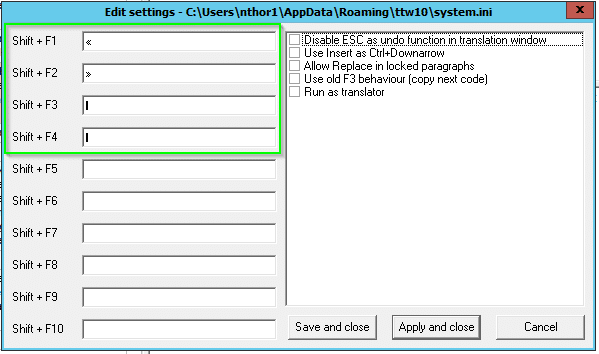
The settings interface shows a thick vertical bar for the Shift+F3 and Shift+F4 options, but when those shortcuts are used in the translation interface, the correct characters will be displayed:
